APEX4 Password Strength Meter Item Plugin
Written by Paulo Vale on Friday, July 16, 2010
Apex: Oracle Application Express, former HTMLDB.

The new APEX release 3.2 is finally available for download. This new version covers essentially the Oracle Forms to APEX converter, but also has some extras regarding security.
Download Oracle Application Express 3.2
Oracle Application Express 3.2 Release Notes
Application Express Documentation and Tutorials
This time, I'll show how to build a simple image gallery using Oracle Application Express (APEX) and taking advantage of Jquery framework capabilities. But first of all, follow the link to see the magic happening ;)
There are several slideshow or gallery plugins for Jquery. You can choose the one you like more and re-adapt the code to fit the plugin requirements. My choice was Pikachoose.
Pikachoose is a lightweight Jquery plugin that allows easy presentation of photos with options for slideshows, navigation buttons, and auto play.
Lets begin creating a simple database structure to store the images.
Create a sequence to be used by image id:
Create a table to store the images:
Now on APEX, following the wizard, create a data entry form based on "GAL_IMAGES" table.
Go to Shared Components>Application Items and Create an Application Item. Ex: G_IMAGE_ID.
Create an Application Process to retrieve the image from the database. Identify the point at which this process will run as "On Demand". The point of "On Demand" is that it will only fire when requested by a page process.
Now create the page where you want to put the image gallery and then, Edit Page > HTML Header:
On the same page, create a PL/SQL Dynamic Content region:
And run...
ClockPick is a jQuery time picker plugin. As I showed in previous posts, it's fairly easy to integrate third party javascript components with APEX.
This post is almost a note to myself but I hope to help others when you Google for this little problem.
One of the features introduced with Oracle Apex 3.1 is the Declarative BLOB support. About this subject there is already a good article on Oracle By Example (OBE) site: Defining and Viewing BLOB Data in Oracle Application Express 3.1.
Last Friday I lost almost an hour just to have a simple classic report with an image column. I was getting a ORA-01403 error because simply I wasn't referencing the Table Primary Key in my SQL Query!
These are the steps needed to have the image column successfully displayed:
Report Source Query
Important Tip: You must include the Primary Key column in your query.
Report Column Attributes
Yes, that is right. This blog is one year old.
I thank all of you out there for coming around, reading what I want to say about APEX. Thanks a ton. I hope you will stick with me for the next year too.
Top 10 of most visited posts:
Check all checkboxes
Javascript Calendar Integration
Colorful web forms
Javascript Tooltip Integration
Substitution string and SQL Developer
Populate date field using javascript
Nice filter region template
Translating internal messages used by APEX
Turn Report into PPR Report
A real live APEX application
Most commented posts:
Javascript Tootip Integration
A real live APEX application
Navigate to previous page
Some time ago, I had this requirement to send to the application end users, links to specific pages passing some parameters.
The problem was obtaining the full URL including the server's name and port where APEX was running.
The OWA_UTIL package contains utility subprograms for getting the value of environment variables. Specifically the OWA_UTIL.GET_CGI_ENV function returns the value of CGI environment variables, like REQUEST_PROTOCOL, HTTP_HOST, SERVER_PORT and SCRIPT_NAME, this last one to get the mod_plsql cartridge and the database access descriptor name.
Usage:
You can quickly test these values creating a PL/SQL Dynamic Content region like this:
Now to complete the URL you just need to append the well known f function with the right values. In case you have forget, here is the Apex f function URL Syntax:
It is my first time at Oracle's big event, the OpenWorld. David Peake was kind enough to invite me to participate in one of the official sessions.According to Oracle OpenWorld Blog, the top 25 voted sessions at Oracle Mix will be presented at Oracle OpenWorld 2008. Among the 25 winners there is a good representation of APEX, meaning that APEX community is very active. The winners, APEX related are:
Rank: 1 (113 votes)
Security: Writing Custom Authentication Schemes for Oracle Application Express (Oracle APEX).
Submitted by: Raj Mattamal
Rank: 5 (90 votes)
How to Hack an Oracle Application Express Application.
Submitted by: Anton Nielsen
Rank: 6 (87 votes)
Successfully Developing and Integrating Applications in Oracle APEX Within Oracle E-Business Suite.
Submitted by: Haseeb M
Rank: 12 (75 votes)
(Re)Developing a Logistic Application in Oracle APEX in the Real World.
Submitted by: Roel Hartman
Rank: 16 (68 votes)
Oracle APEX Team Development: Best Practices, Collaboration, and Application Deployment.
Submitted by: Priya Lapham
Rank: 18 (66 votes)
Rapid Development and Validation of Oracle APEX Applications at an FDA-Regulated Medical Device Company.
Submitted by: Deb Groskreutz
Rank: 21 (61 votes)
Using Oracle APEX to Analyze Your PL/SQL Source Code.
Submitted by: Flavio Casetta
I'm obliged to say that the Interactive Report Regions is one of the best features in APEX. The possibilities are huge. It's like passing the power to the end users.
A few days ago, I've posted about IRR having an upgrade in the next APEX release. The feature is being called as websheets. The possibility of having a tabular form with inline edit combined with the actual IRR features it's a "just can't wait" functionality.
Still, Interactive Reports are not perfect :) There are some functionalities I miss from the classic reports. I know that I can still use the classic reports, and I do use them many times, but having the possibility I tend to use the IRR as much as I can.
One of the functionalities I miss the most from classic reports is the possibility of being based on a function returning a query. This adds the possibility of a report being dynamically based on different tables or views and having dynamic where clauses. One of the situations where this is very useful is if you want to build a report wizard system in your application.
When creating a form region on APEX, there are several options to base the form such as a table, a view, a webservice or... a stored procedure.
Creating a form based on a stored procedure can be very useful to execute database manipulation operations in a simple way. In fact, it is even possible to obtain responses from the database directly to an APEX page using OUT parameters.
To illustrate this, here is a simple example. Let's say you want to build a form where a user is asked to guess a number. The page should also inform the user if the guessing is right or wrong.
First of all let's create the procedure. Note that there are two parameters on this procedure. p_guess (IN parameter) is used to send the value and p_result (OUT parameter) is used to receive the procedure response.
Now to create the form, create a new page or region. Next choose "Form", "Form on a Procedure", identify the database schema and enter the stored procedure name. Follow the form wizard creation till the end entering adequate values.
After you run the page you will be presented with two fields. Enter a value into "P_Guess" and press submit button to get a response into "P_Result".
Now to beautify the form you can hidde the result field and integrate the response message into the notification template. If you go to page edit mode you will see the auto-generated "Run Stored Procedure" after submit process. Edit this process, click "Messages" and put the reference to the item "Process Success Message" like this: &P6_RESULT.

Follow the link to run this example: http://apex.oracle.com/pls/otn/f?p=25110:6
Just came across this blog post on Dimitri Gielis's Blog and I just can say.... well, just follow the link and see for yourself. Web 2.0 features out of the box, tabular form with inline Edit and much much more.
The screenshot was stolen from Dimitri Gielis's Blog.
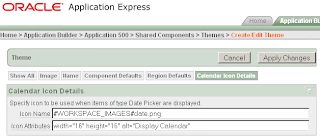
So you don't like de default Date Picker icon? The good news is that there a very simply way to change it.
Today I had this requirement with a Select List with Submit in a new application I'm developing. I had a form with an Automatic Row Processing (DML), After Submit process. This process is used only for updates and should be triggered when the value of a Select List changes.
I've created the Select List with Submit but the process was not executed. The reason is that by default the request value is the name of the Select List item and as you can see in the previous picture, the data manipulation process will perform a SQL UPDATE only when the request value is one of the listed values (SAVE, APPLY CHANGES, UPDATE, UPDATE ROW, CHANGE, APPLY, APPLY%CHANGES%, GET_NEXT%, GET_PREV%).
To get around this, here is what I did: first I've changed the item back to a normal Select List and then added the following code to the 'Element > HTML Form Element Attributes' property:onchange="doSubmit('UPDATE');"
Here is a screenshot of the Select List item properties:
Happy programming :)
Yes it's true, the patch is out. I found it reading Joel Kallman blog. As Joel states in his blog, this not a new APEX version... it is a patch with bug fixes.
One of the things that makes me happy with our decision at Neoface of directing all the development efforts to this technology (APEX) is the frequent updates APEX team is giving us.
They are doing a great job.
One of the good things that Oracle APEX Team made to help the new developers are the Packaged Applications. Packaged Applications are working example applications that you can use to get the feel of APEX capabilities. You can also learn how things get done, since you can access all the source.
This leads me to the point of this post. I like very much the way, reports filters and options are organized in these example applications. The person who made this, certainly has a good taste :)
Look at the next screenshot to see what I mean. I'm talking about that gray region where the search field and conditions are.
Since I liked it so much, I've decided to use it in my applications. For instance, I've integrated this region template in our APEX built CRM App (Better.CRM).
How to do it? :) Just copy the code from any of the Packaged Applications and then:
- Shared Components > Templates > Create
- Template Type: Region
- Create Region Template: From Scratch
- Name: Finder Bar
- Template Class: Button Region Without Title
- Template Code:
Now you just need to create an HTML Region in your page, apply the new Finder Template and include the fields in the region.
That's it. I hope this helps you make good looking apps :)
I would like to point you to a new APEX related blog. João Oliveira is my personal friend, works with me at Neoface and he is an experienced Oracle DBA.
Welcome. My name is Paulo Vale I'm co-founder and development director at neoface, a portuguese software company. Neoface is an Oracle partner since 2005.
About the blogOracle Application Express (Apex), former HTMLDB, is a simple to use yet powerful tool for developing web applications. This blog shares experiences using this great piece of software.